


CharmPass
4.51.36K Reviews
App Specs
- Version
- 3.21.7458
- Updated On
- License
- Free
- Downloads
- 100,000+
- Developer
- MTA IT
- Categories
- Travel & Local
- Platform
- Android
Screenshots
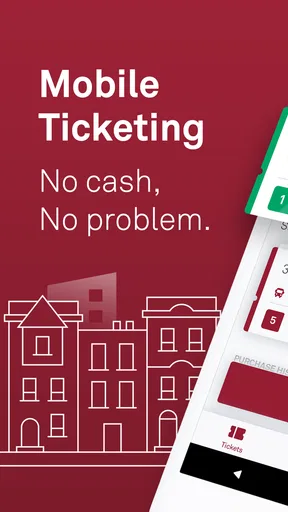
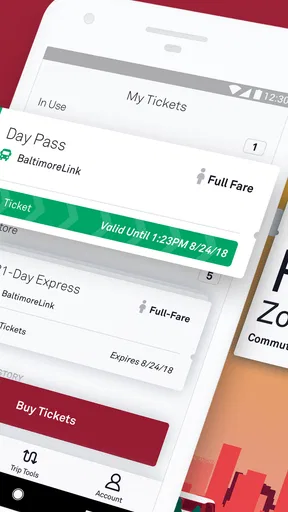
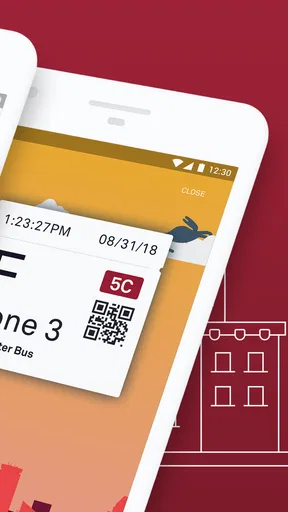
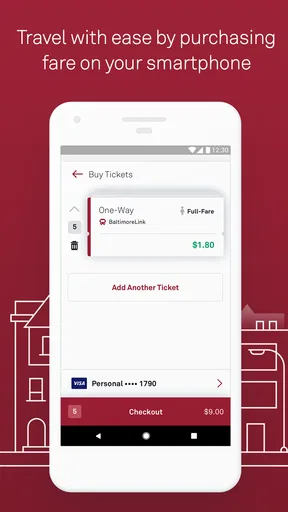
 Analysis by AppCompare
For anyone using Maryland public transportation, CharmPass is the kind of app that can remove one small but important source of stress: finding a way to pay for a trip before boarding. It is the official mobile ticketing app from MDOT MTA, developed by MTA IT, and its purpose is refreshingly focused. Rather than trying to become a general travel planner, it gives riders a digital way to handle MTA fares from a phone.
I approached it as a first-time rider would: install it, understand what it is meant to do, prepare a ticket, and work out what to do when the journey does not go exactly as planned. That focus is the app’s biggest strength. It is free, aimed at Everyone, and available for devices running Android 6.0 or later. The current version is 3.21.7458, so it is worth checking that an older phone meets the minimum requirement before trying to install it.
CharmPass is most useful when you want to prepare your fare before you reach the vehicle or station. That sounds simple, but it changes the rhythm of a commute. Instead of searching for cash, dealing with a machine, or hoping a physical ticket is still where you left it, I can make the payment step part of my preparation. The app does not replace good travel planning, but it can make the fare portion feel more organized.
What to expect before your first trip
The first thing to understand is that CharmPass is a ticketing tool, not a complete replacement for every travel app you may already use. If I need route ideas, walking directions, or a broad comparison of transportation options, I may still prefer a map app or another journey-planning service. CharmPass fits into that process at the payment stage. I decide how I am traveling, then use the app to handle the relevant fare.
That distinction matters for new riders. Someone downloading it while standing on a busy street may expect the app to guide every part of the trip. I would not rely on it for that alone. I would first work out the route and timing, then open the ticketing app with a clear idea of what I need. This reduces the chance of buying the wrong fare simply because I am trying to solve navigation and payment at the same time.
The app has built a respectable user base. It has passed one hundred thousand installs, with an average rating of 4.5 from roughly 3.6 thousand ratings and about 1.4 thousand written reviews. Those figures suggest that it is not an obscure experiment, although popularity should not be confused with universal suitability. A commuter who regularly uses MDOT MTA services will get more value from it than a visitor making one uncertain trip.
Because the application is free, the main decision is not whether the download costs money. The real question is whether digital ticketing matches the way I travel. If I prefer physical payment, have an unreliable phone, or do not want to manage tickets on a screen, a traditional option may feel more comfortable. CharmPass is convenient when the phone is part of my normal travel routine, but it also makes the phone an important part of the journey.
Worth Reading Before You Choose

Flipboard Shows What News Apps Must Do Beyond the Feed

Switching to Android Auto Means Rethinking Your Driving Routine

Google Calendar Makes a Crowded Week Easier to Manage

Ludo King Makes the Most of the Minutes Between Plans

Baby Panda World Brings Quick Play to Modern Phones, but Its Game Library Feels Busy

ESPN’s Live Game View Makes Following Close Games Easier
That creates a practical trade-off. A digital ticket is easier to keep track of than a loose paper item in some situations, yet I still need to keep the device charged, unlocked when necessary, and available for inspection. I would not treat the app as a reason to leave a charger or backup plan at home. The convenience is real, but it depends on basic phone readiness.
Setting up without rushing
For a smoother first attempt, I would install CharmPass before leaving for the trip rather than at the platform or stop. The best setup moment is when I have a few quiet minutes, a stable connection, and enough time to read each screen. This is especially important for a first-time user because ticketing mistakes are more frustrating when a vehicle is about to arrive.
After opening the app, I would take a moment to become familiar with the layout before making a purchase. Look for the area where tickets or fares are selected, the place where an active ticket can be viewed, and any account or purchase history area that helps you confirm what happened. The exact flow can feel less intimidating once you know where to return if you need to check a ticket later.
I also recommend deciding the journey details before tapping through the purchase process. Know whether you are buying for the trip you are about to take or preparing for a later ride. Avoid making a hurried selection based only on the first option that appears. A digital interface can make buying fast, but speed is not the same as certainty.
One useful habit is to pause after payment and verify the result rather than immediately closing the app. I want to see clear evidence that the ticket is available in the app and understand how to bring it back up. This small check is more valuable than assuming the transaction worked because I tapped a button. If the ticket is not visible where I expect it, I would resolve that before boarding.
Another sensible step is to familiarize yourself with the phone’s basic behavior. If the screen dims quickly, if notifications cover the display, or if you tend to switch between several apps, practice returning to CharmPass. The goal is not technical expertise; it is simply knowing how to show the relevant ticket without fumbling through the phone in front of other passengers.
The first successful action: buying and showing a ticket
The first meaningful success with CharmPass is not merely installing it. It is completing a purchase and being able to retrieve the ticket when it matters. I would make that first attempt before the busiest part of the day, then confirm that the ticket is easy to find. Once that works, future trips become much less intimidating because the basic sequence is familiar.
My preferred routine would be to open the app while preparing to leave, select the fare that matches the planned journey, complete the purchase, and check the ticket screen before walking to the stop. I would avoid waiting until the last possible moment. Even if the app responds quickly, a crowded platform is a poor place to learn the interface.
When boarding or entering the relevant travel area, I would keep the phone accessible rather than buried in a bag. That does not mean leaving the ticket displayed unnecessarily for the entire trip. It means reducing the number of steps between a request to see the fare and the screen that confirms it. A little preparation makes the digital process look much more effortless.
For a realistic everyday example, imagine a morning trip where I am leaving home later than planned. I already know which MTA service I need, so I use the few minutes before walking out to select the appropriate fare in CharmPass. Once the ticket appears, I check it, put the phone in an easy-to-reach pocket, and head out. At the stop, I am not trying to compare fare choices while people are boarding. The app has done its job by moving that decision earlier.
The same workflow is helpful for an occasional rider visiting the Baltimore area who does not want to search for payment options at the last second. However, I would still recommend learning the route separately. CharmPass can support the fare part of the visit without necessarily being the only tool needed to understand where to go.
A less obvious benefit is that digital preparation can make repeat travel more consistent. If I take a similar trip several times, I can develop a routine around opening the app, checking the correct fare, and confirming the active ticket. That reduces mental effort. It is not a dramatic feature, but it is the kind of small improvement that makes an app worthwhile over time.
Where first-time users may become confused
The most likely confusion is mixing up a purchased ticket with a ticket that is ready to be shown. I would pay attention to the difference between completing a transaction and activating or presenting the fare, if the app’s flow separates those steps. A purchase confirmation is not automatically the same thing as the screen I need during inspection. Reading the labels carefully is more reliable than guessing from color or position.
Another point of friction is choosing the right fare while distracted. CharmPass is not a substitute for knowing the basics of the journey. If I am unsure which service, direction, or fare applies, I would pause and verify that information before paying. The app can make a selection available, but it cannot make an uncertain travel plan certain.
I would also avoid assuming that closing the app means the ticket has disappeared. Digital products often keep purchases associated with the account or device, but the practical question is where the ticket can be reopened. Before the first trip, I would deliberately leave the ticket screen, return to the app, and find it again. That simple rehearsal answers a question many new users only think about after boarding.
Phone connectivity can also affect confidence. I would not begin a ticket purchase in a place where the connection is clearly unreliable if I have another opportunity to prepare earlier. Even when the app itself is straightforward, a slow network can make a normal transaction feel like a failure. Buying shortly before departure is possible, but it is not the workflow I would recommend to a nervous first-time rider.
There is also a human factor. A physical ticket is immediately understandable to many people because it can be held in the hand. A phone ticket requires knowing which screen to open and how to keep the device ready. For a rider who frequently lends a phone to a child, shares travel responsibilities, or uses a device with limited battery life, that distinction may make a physical method more practical.
Privacy and account habits deserve ordinary, not dramatic, attention. I would use my own account carefully, review the purchase screen before confirming, and avoid handing the unlocked phone to someone else without thinking about what else is visible. CharmPass is a transportation utility, but it still lives on a personal device alongside messages, photos, and other accounts.
How it compares with familiar alternatives
The usual alternative is paying through a physical method, such as cash or another fare medium available for the service. That approach can be reassuring because it does not depend on the phone. It may be better for someone who travels rarely, has a weak battery, or does not want to create a digital routine. The downside is that physical payment can be less convenient when I want to prepare before leaving or avoid searching through a wallet.
A general mobile wallet may feel more natural for people who already use their phone for everyday purchases, but a dedicated transit ticketing app has a clearer role. CharmPass is specifically connected to MDOT MTA ticketing rather than being a broad payment tool. That specialization can make it easier to think in terms of a trip and a fare, while a general wallet may be better suited to ordinary retail purchases.
Route-planning apps are another common alternative, but they solve a different problem. They can help me decide how to travel, whereas CharmPass is focused on obtaining and managing the fare. I would use them together when necessary instead of expecting one application to replace the other. For a regular MTA rider, that separation can actually be helpful: one tool handles directions, and the official ticketing app handles the ticket.
The strongest reason to choose CharmPass over a traditional method is preparation. I can deal with the fare before the pressure of boarding. The strongest reason to skip it is dependence on the phone. Neither side should be ignored. In my view, the app is a good fit for riders who already trust their phone as a travel companion, but it is not automatically the best answer for every passenger.
Small habits that make the app more dependable
I would create a simple pre-trip checklist: confirm the route elsewhere if needed, open CharmPass, select the fare carefully, complete the transaction, and locate the ticket again. This is more useful than memorizing a complicated procedure. After a few trips, the sequence becomes quick without becoming careless.
For repeat journeys, I would check the fare selection every time rather than relying entirely on muscle memory. A familiar route can still have different circumstances, and tapping through automatically is how avoidable mistakes happen. The extra second spent reading the screen is worthwhile.
For occasional travel, I would not wait until the day of the trip to discover how the app behaves on my phone. Install it in advance, explore the ticket area, and make sure the device meets the Android requirement if you are using an older handset. That preparation is particularly valuable for visitors who may already be managing maps, messages, and travel information at the same time.
I would also keep a non-digital fallback in mind when the trip is important. This is not a criticism unique to CharmPass; it is a general consequence of relying on a phone for access to a service. If the device is nearly empty, damaged, or unavailable, convenience can quickly turn into inconvenience. A backup payment plan or a charged phone makes the whole experience less fragile.
One practical trade-off is timing. Preparing a ticket early reduces stress, but it also means I must understand when the ticket becomes usable and how the app presents its status. I would read the on-screen wording instead of assuming that buying and using are identical actions. That is the single piece of advice I would emphasize to a friend installing it for the first time.
Who should use it, and who may prefer something else
CharmPass is a strong choice for regular MDOT MTA riders who want a digital ticketing option and are comfortable using a smartphone during the journey. It is also useful for people who dislike handling cash or physical fare items and prefer to prepare before reaching the stop. The free price makes it easy to try without committing money to the app itself.
It can work well for an occasional visitor too, provided that person understands the app’s role. I would recommend it to someone who already knows the planned route and wants a more organized way to handle the fare. I would be less enthusiastic about recommending it as the only travel tool to someone who has not yet worked out where to go.
I would suggest a physical alternative for riders with unreliable phones, limited battery, or a strong preference for non-digital travel. I would also hesitate to make it the sole plan for a group if one person is expected to manage every ticket on one device. The app may still be useful, but the group should agree in advance on how tickets will be handled and shown.
The Everyone age rating makes the app broadly accessible, but accessibility in practice also depends on the rider’s comfort with mobile screens. A family helping a younger passenger should make sure that the person traveling can reach the correct ticket or has a clear arrangement with the accompanying adult. The rating describes general suitability; it does not remove the need for a sensible travel plan.
My recommendation after using it
CharmPass earns its place by making the fare step more deliberate and less hurried. I like that its purpose is clear: it is an official MDOT MTA mobile ticketing app rather than a vague travel companion trying to do everything. The strongest experience comes when I prepare the ticket before leaving, confirm what I bought, and know exactly where to find it again.
Its limitations are equally clear. It does not remove the need to understand the journey, and it makes the phone part of the travel process. A weak battery, poor preparation, or uncertainty about the correct fare can undermine the convenience. Riders who want a completely offline or physical experience may be happier with another option.
Still, for the right user, the workflow is sensible. Install it ahead of time, explore the ticket screen, make the first purchase without rushing, and practice retrieving the result. Once that first successful action is complete, future trips feel more routine. With its 4.5 average and growing install base, the app appears to be serving a real need, and my recommendation is positive for Maryland transit riders who want digital fare management without unnecessary extras.
My final advice is simple: treat CharmPass as one part of your travel setup, not the entire setup. Use another tool when you need directions, keep your phone ready, and give yourself enough time to verify the ticket. If that approach matches the way you already travel, this free app from MTA IT is a practical choice for turning an easily forgotten task into a predictable part of the trip.
Pros
- Buy and validate tickets directly from your smartphone.
- Useful for planning journeys across multiple transport services.
- Digital tickets reduce the need to carry paper passes.
- Real-time travel information helps with route decisions.
- Supports convenient ticket management in one central app.
Cons
- Some features may depend on network coverage or mobile data.
- Account registration and payment details are required for purchases.
- Ticket options can vary depending on location and transport provider.
- A low phone battery may make accessing tickets difficult.
- Users may need to activate tickets carefully before boarding.
FAQs for CharmPass
What is CharmPass and what can I use it for?
CharmPass is a mobile ticketing application designed for public transportation in the Baltimore region. After installing it, users can browse available fares, purchase tickets or passes, and display a valid mobile ticket when boarding eligible services. It is intended to make everyday travel more convenient by reducing the need for cash, paper tickets, or visits to a ticket machine.
Which transportation services and tickets are available in CharmPass?
The exact services and fare products available in CharmPass depend on the participating Baltimore-area transportation agencies and the route you select. The app commonly provides access to options such as local bus, light rail, metro, commuter services, and other eligible transit products. Before buying, check the ticket description, validity period, zones, and any route restrictions shown in the app.
How do I purchase and use a ticket in CharmPass?
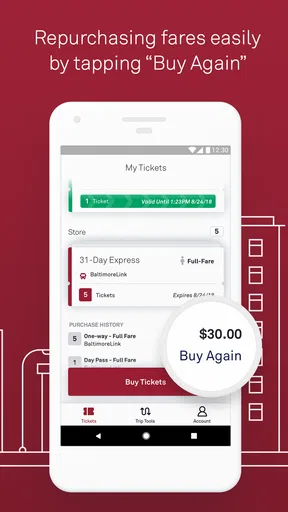
To use CharmPass, create or sign in to your account, choose the relevant transportation service and fare, and complete payment through the available checkout method. Your ticket is then stored in the app. Activate it only when you are ready to travel if the product requires activation, and keep the ticket screen available for inspection. Make sure your phone has enough battery and brightness.
Does CharmPass work without an internet connection?
CharmPass generally requires an internet connection for account access, ticket purchases, and updates, so it is best to buy your fare before arriving at the station or stop. Once a ticket has been activated and loaded, it may remain visible temporarily without continuous connectivity, but this can depend on the ticket type and app behavior. Do not rely on offline access unless you have confirmed it beforehand.
Can I get a refund or transfer a CharmPass ticket to another phone?
Refunds, cancellations, and ticket transfers are controlled by the transportation agency and the specific fare purchased, so they are not necessarily available for every ticket. Unused tickets may have different rules from activated or partially used tickets. If you change phones or lose access to your account, sign in on the replacement device and contact CharmPass or the relevant transit agency promptly if your ticket does not appear.


